|
License troubleshooting
In general, the license process should be transparent.
We do ask that upon receiving the license ID and password, that you enter them into the system (File > Enter License Codes).
Please reference this page if you are entering license codes, and:
--you do not have an Internet
connection, or
--there is a firewall blocking your registration, or
--any other issue which prohibits you from completing the license process
From the main menu select File > Enter License Codes
1. Enter your license ID and and password, then click 'Register'.

2. Click on the message that you get after clicking Register:

or

or if you get the message below, continue with the steps that follow
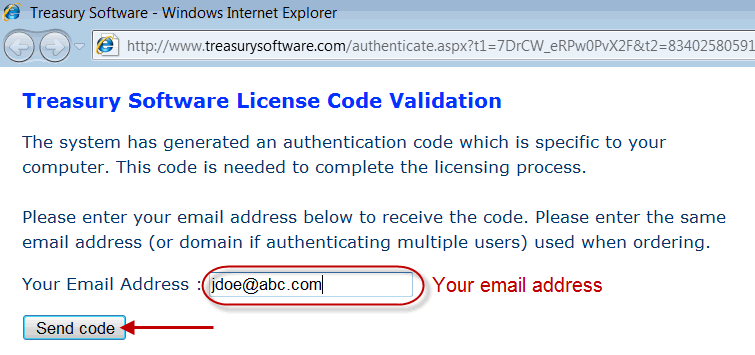
3. Click OK and it will open up a web page.
4. Enter your email address and click 'Send code'
Note: If there is no Internet and the page is not displayed, copy the entire URL to Notepad (or similar) and save the file. Copy the file to another computer that has Internet access and paste the URL into their browser. Continue with the steps below.
5. Check your email for an authentication code from Treasury Software

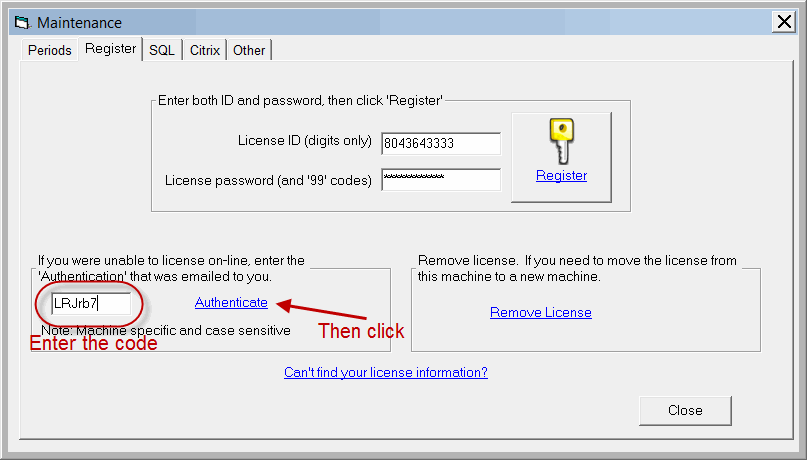
6. Enter the case-sensitive authentication code into the authentication box and click 'Authenticate'.
Congratulations
|