 Setup
Setup
Creating CPA-005 1464 byte files for Electric Funds Transfers (EFT)
1. Create a new account within the software
Click File > New Account and complete the Wizard.
2. From the Home page, click on the Canadian Format button.

3. Complete the Canadian Options panel
Click on 'Activate Canadian format', then click on your bank and select a five digit Institution ID.
If your bank is not listed, select 'All Other Banks' and continue.
Enter your company information as requested and then click OK.
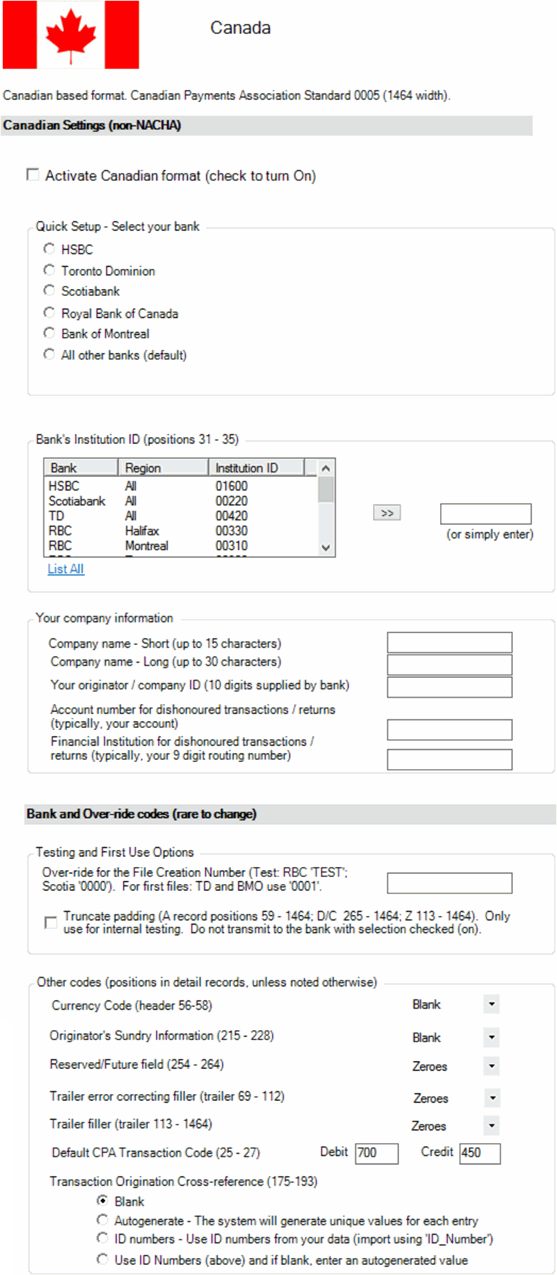
Notes:
--It is very unusual for you to need to adjust the settings in the 'Bank and Over-ride codes' section.
--Enter a short (abbreviated up to 15 characters) company name as well as a long company name ( up to 30 characters) - as either may be displayed on the other party's bank statement.
FAQ's
Should I enter any information within the ACH File Setup Wizard (7 screens)?
No, please leave the settings at their default settings - and any entries empty.
Testing with my bank - any special settings?
Yes, please enter the following into the 'Over-ride for the File Creation Number' field (do not enter the apostrophes):
RBC, enter 'TEST'
Scotiabank, enter '0000'
First time creating a file to be sent to the bank - any special settings?
Yes, please enter the following into the 'Over-ride for the File Creation Number' field:
TD, enter '0001'
BMO, enter '0001'
After you've created the files for the above scenarios, delete the entry from the 'Over-ride for the File Creation Number' field.
Click 'OK' when you're all set.