
Placing records on hold |

|

|

|
|
Placing records on hold |
|
|

|
Placing records on hold |
|
|
|
|
Placing records on hold |
|
|
|
|
|
||
Placing records on hold
This feature enables you to place transactions on hold, until you are ready to process them.
How it works
Import records as usual
Enter records as usual, whether from an integrated accounting package, Excel, a comma delimited file - or even from another ACH file.
Run an Untransmitted ACH Records report - and select the records to place on hold
Select the records - and from the reports menu, select Actions > Mark to Hold
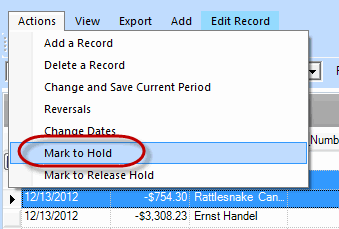
The records you select will be placed on hold - and will not be included in an ACH file.
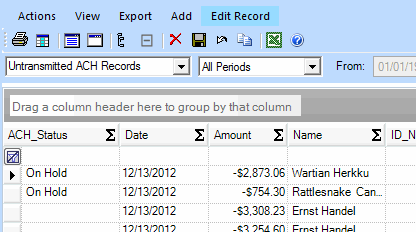
The next time you run the report, you can see the status of the records in the first column:
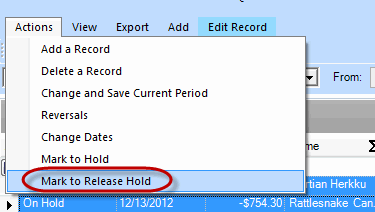
Run an Untransmitted ACH Records report - and select the records to release for payment
Select the records - and from the reports menu, select Actions > Mark to Release Hold
Notes:
--This feature is available in ACH Universal 2013 and later.
--Records placed on hold and subsequently released, are classified as manually added for audit trail purposes, and can be reviewed in the Manually Added report, as well as the Transmission Log details.