Import |

|

|
|
Import |
|
|
Import |
|
|
|
Import |
|
|
The Import tab is selected by default when General Options is loaded. It looks like Figure 1 (below).
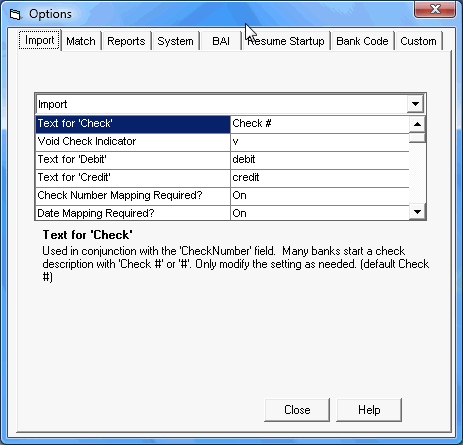
Figure 1- Options dialog box (Import tab selected)
Below are all the options available under the Import tab. Click the link for more information. Please note: options can be set differently for bank and general ledger data. The options below group multiples into one link to save space. These will have an X where the option would be with the type (bank, G/L) listed in parentheses and separated by semicolons.
•Text for 'Check'
•Void Check Indicator
•Text for 'Debit'
•Text for 'Credit'
•Check Number Mapping Required?
•Date Mapping Required?
•Multi-line Check Format
•Imported amounts need decimals - X (Bank;G/L)
•Custom Date Import (CDI): X (Bank; G/L; CC)
•CDI: Source Format X (Bank; G/L; CC)
•CDI: Separator X (Bank; G/L; CC)
•CDI: Embedded Start X (Bank; G/L; CC)
•X - Daily Reconciliations (Bank; G/L)
•X Import contains: (Bank; G/L)
•X Import: Search for non-check dupes (Bank; G/L)
•X Import: Stop import or exclude on dupes? (Bank; G/L)
•X Import: Use multi-period warnings (advanced) (Bank; G/L)
•Filter Import - X (Bank; G/L)
•SQL - Timeout (in seconds)
•# X copy and paste (columns; rows)
•G/L Only: Suppress Void Indicator when embedded
•Text for Manually Added records
•Suppress void check warning on import
•Suppress prompt to show file after creation