The following steps require advanced SQL Server knowledge and system administrator access to the server.
If you are getting an error message similar to
error: 26 - Error Locating Server/Instance Specified this page may be applicable for you.
Overview
There are a number of connection protocols associated with SQL Server. The ability to login, or see a server - does not necessarily mean that you can connect to it to read/write data.
Make sure the SQL Browser service is running on the server.
If a firewall is enabled on the server (or exists between the server and the client), you need to put sqlbrowser.exe and/or UDP port 1433 and 1434 into the exception list.
To verify that the SQL Server Browser service is running, from the Windows Start button > Programs >
Microsoft SQL 2008 > Configuration Tools > SQL Server Configuration Manager
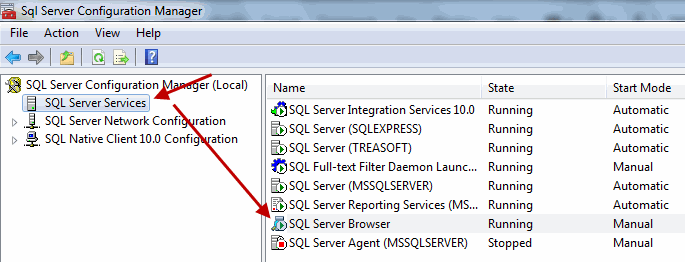
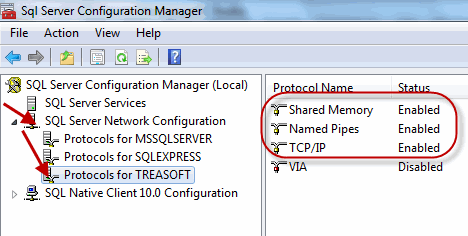
While the SQL Server Configuration Manager (above) is still open, click on SQL Server Network Configuration
Make sure that TCP/IP is enabled
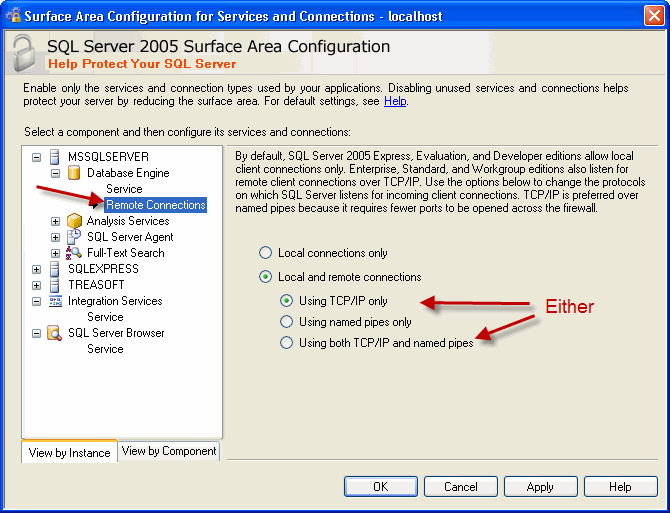
Windows Start button > Programs > Microsoft SQL 2005 > Configuration Tools > SQL Server Surface Area
Make sure allow Remote Connections (with TCP/IP) is enabled for the server\instance.
Note: You may want to reboot the SQL Server after making these changes.






 SOC2, Type II
 (866) 226-5732

