
By default, batching rules will follow all NACHA requirements. The batch can contain (the batch service class code is in parenthesis):
Both Debits and Credits (200)
Credit only (220)
Debits only (225)
In addition, some banks have some additional requirements - and that is the separation of Debits from Credits in their batches. Note: This is not contrary to any NACHA rules - it is an additional rule that is added to the batch process.
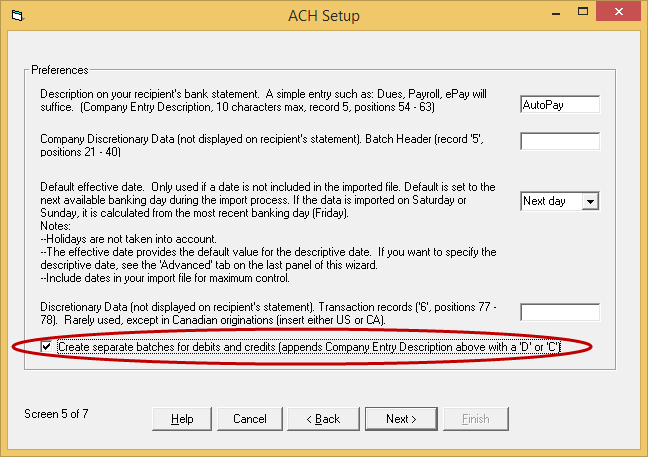
To separate out debits and credits, simply enable the feature within ACH Setup (Settings tab > ACH Setup).
Upon starting ACH Setup, proceed to screen 5, enable the feature and complete the wizard.
Notes:
The separation of Debits and Credits is inherently contra-indicated with the use of balanced records, as a balanced batch will always create an offset debit/credit record.
Pre-notification ($0.00) entries are not covered by this feature. Therefore simply process pre-notes separately to create separate batches.






 SOC2, Type II
 (866) 226-5732

